
CVS Specialty
CVS PharmacyMedical
3.11.28K Reviews
- Version
- 2.84
- Installs
- 500.00K
- Age Rating
- Everyone
Screenshots

Our Review of CVS Specialty
 Analysis by Appyee
Managing a specialty prescription is rarely as simple as picking up an ordinary medicine. Refills, reminders, adherence, and communication with the pharmacy can all become separate tasks, especially when treatment continues for months. I reviewed CVS Specialty as a medical app from CVS Pharmacy to see whether it actually makes that routine easier, rather than merely placing another shortcut on a phone.
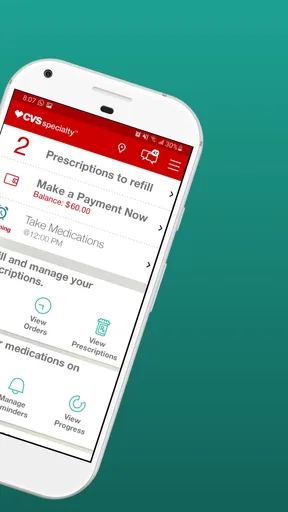
My overall impression is practical but measured. The app is free, aimed at Everyone, and focuses on a narrow job: helping people order specialty medications, set reminders, and follow their adherence progress. That focus is useful when your treatment already runs through CVS Specialty. It is much less compelling if you only need a general medication alarm, a broader health record, or a way to manage prescriptions from several unrelated pharmacies.
Following a specialty prescription from request to routine
I find the most useful way to think about this section is as a chain of small handoffs, not a single button press: a request begins the pharmacy process, while reminders and progress tracking help bring the medication into a repeatable routine. Keeping those steps distinct can make it easier to spot whether the next action is yours or needs follow-up elsewhere.
The starting condition matters more than the download
The first question I would ask before installing it is not whether the interface looks convenient. It is whether CVS Specialty is already part of your medication process. This is not a general-purpose pharmacy app with every possible health tool gathered into one place. Its value begins when you have a specialty medication and need a more organized way to stay connected to the pharmacy and your treatment schedule.
That distinction prevents a common disappointment. Someone looking only for a simple alarm may find a dedicated reminder app faster and more flexible. Someone who wants to compare local pharmacy stock, manage ordinary household prescriptions, or combine records from several providers may prefer a broader pharmacy or health platform. CVS Specialty makes more sense when the pharmacy relationship is already established and the medication routine needs follow-through.
I also appreciate that the app does not present itself as a replacement for medical advice. Its role is administrative and supportive: keeping the prescription process visible, encouraging consistent use, and showing adherence progress. Decisions about dosage, side effects, missed doses, or changes in treatment still belong with the prescribing clinician or the appropriate pharmacy team.
CVS Pharmacy is the developer, and the app has been available since December 6, 2014. Its current version is 2.84 and it requires Android 8.0 or later. Those details are worth checking before planning to use it on an older phone, particularly if the device is kept only for health-related tasks. On a compatible device, the basic barrier is low because there is no purchase price.
Ordering is the first handoff
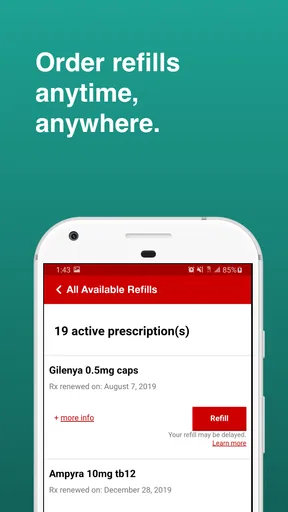
The central workflow starts with the medication request. Instead of relying entirely on memory, a phone call, or a paper calendar, the app gives the specialty prescription a place in the same routine as the rest of your phone-based tasks. I found that useful because the hardest part of specialty medication management is often not understanding that a refill is needed; it is remembering to begin the process early enough to avoid a stressful gap.
A good habit is to open the app at a calm moment and treat the request as a small planning task. Check the medication you intend to order, review what the app shows, and make sure the request is for the treatment you actually need. This sounds obvious, but it is an important safeguard when several prescriptions have similar names or when a family member helps manage medications.
The app’s focused design can reduce the mental switching involved in moving between a calendar, a notes app, and pharmacy communication. A request is connected to the broader specialty-care routine rather than being an isolated reminder. That connection is the main reason I would choose it over a generic alarm for this particular use case.
There is still a human handoff here. The app can help you initiate and organize the pharmacy side of the process, but it does not eliminate the need to pay attention to messages, timing, or questions from the care team. I would not assume that tapping a request means the medication is immediately ready, dispatched, or clinically approved. The sensible approach is to use the app as a tracking point and confirm the next step when the situation is time-sensitive.
Reminders work best when they are tied to a routine
The reminder feature is more valuable when it is attached to a real daily habit. I would place the reminder near something dependable, such as breakfast, an evening hygiene routine, or preparing a work bag. A notification that appears at a random time is easy to dismiss; one that arrives when the medication is normally taken has a better chance of becoming part of the day.
One non-obvious advantage is that reminders can serve two different purposes. They can prompt the dose itself, but they can also help create a separate checkpoint for the next refill request. Keeping those moments distinct avoids the mistake of treating “I took today’s dose” and “I have enough medication for the coming weeks” as the same task.
I would also avoid turning every notification into an emergency signal. If the app allows you to establish reminders for your adherence routine, use a consistent, realistic schedule rather than setting an excessive number of alerts. Too many prompts can create notification fatigue, especially for people already receiving messages from doctors, insurers, and other health services.
For a household where another person helps with treatment organization, the reminder can be a useful conversation cue, but I would not treat it as proof that the dose was taken. A notification indicates that it is time to act; it does not replace the person’s own confirmation or clinical instructions. That distinction is particularly important when adherence records may later be discussed with a healthcare professional.
Adherence progress turns a vague concern into a visible pattern
The progress-tracking element is where the app becomes more than a refill shortcut. Instead of asking yourself, “Have I been consistent lately?” you can use the record as a prompt for a more precise conversation with the pharmacy or prescriber. Even when the result is not perfect, seeing a pattern can help identify whether the problem is forgetfulness, an irregular schedule, travel, difficulty arranging refills, or uncertainty about what to do after a missed dose.
I consider this one of the most useful features for people who feel that their treatment routine is slipping but cannot explain why. A visible record can reveal that missed doses cluster around weekends, late shifts, appointments, or refill delays. The practical benefit is not the score itself; it is the opportunity to change the routine based on a recognizable cause.
There is a trade-off. A progress display may motivate one person and make another feel judged. I prefer to treat it as a planning tool, not a grade. If the record shows a problem, the next step should be figuring out what made the routine difficult and discussing medication-specific guidance with a professional when necessary.
Where the handoffs still require attention
A specialty prescription often passes through several stages: the patient initiates a request, the pharmacy processes it, delivery or pickup arrangements are handled, and the patient incorporates the medicine into daily life. The app sits across that chain, but it should not be confused with every participant in it.
The first handoff is from you to CVS Specialty. You provide the request and any information the workflow asks for. The second is from the pharmacy process back to you, through whatever status or follow-up the app presents. The third is from the digital reminder to your own behavior. That final handoff is easy to overlook because it happens outside the screen, yet it determines whether the app actually improves adherence.
My advice is to make a small personal checklist around the app: request when the supply reaches your chosen planning point, review any follow-up promptly, note when the medication arrives, and keep the reminder aligned with the prescribed schedule. I would not invent an extra dose or change timing simply because a notification was missed. For medication-specific questions, the safer route is a pharmacist or prescribing clinician.
This workflow also explains why the app may feel limited to some users. It is designed around a particular pharmacy relationship, not around complete independence from that relationship. If your insurance, prescriber, caregiver, or delivery arrangement introduces a separate step, you may still need another communication channel. The app can organize your part of the process without making every external dependency disappear.
A realistic everyday scenario
Imagine a person who works irregular hours and takes a specialty medication every evening. Their main problem is not a lack of concern; it is that the refill request is easy to postpone after a long shift. They install the app, use it to keep the specialty prescription in view, set a reminder around the evening routine, and watch the adherence progress over time.
After a few weeks, the person notices that the daily reminder is not the only issue. The treatment routine is mostly consistent, but refill planning is happening too late. The useful adjustment is to create a separate planning moment before the supply becomes urgent. The app’s value in this situation comes from linking the medication routine with the pharmacy task, rather than relying on one alarm to solve both problems.
Now consider a caregiver helping an adult family member. The caregiver may use the app as a shared reference during a weekly check-in, looking at whether a refill request needs attention and whether the routine appears consistent. However, the caregiver should still confirm what happened in real life and avoid interpreting an incomplete record as a medical conclusion. The app supports coordination; it does not replace communication between the patient, caregiver, pharmacist, and clinician.
What the numbers suggest about its place in the market
The app has an average rating of 3.1 from around 2.9 thousand ratings, with roughly 1.3 thousand written reviews. It has passed 500 thousand installs, so it is not an obscure experiment, but the middling rating is a useful warning against expecting a flawless experience on every phone or in every pharmacy situation.
I read that reception as a sign to keep expectations specific. A focused medication workflow can be genuinely helpful when it matches your needs, while still feeling frustrating if a request needs clarification or if you expect the app to cover services outside specialty prescriptions. The install count shows that many people have tried it; the rating suggests that convenience depends heavily on how closely the app fits the user’s existing CVS Specialty process.
Compared with a generic medication reminder, CVS Specialty offers a more direct connection to specialty prescription management and adherence progress. The generic alternative may be better for multiple pharmacies, custom schedules, family medication lists, or medicines that have nothing to do with CVS Specialty. Compared with a full health-record app, CVS Specialty is narrower but potentially less cluttered for this one job. Compared with calling the pharmacy, it offers a self-service starting point, while a phone conversation remains better for unusual cases or questions that need immediate explanation.
Where the flow breaks down
The biggest weakness is dependence on a clean, predictable workflow. If your prescription details change, your coverage requires extra coordination, or your treatment schedule is complicated, the app may not be enough on its own. Its reminders and progress view can support the routine, but they cannot resolve a clinical question or negotiate every administrative issue.
Another limitation is the risk of false reassurance. A visible progress record can make the routine feel controlled even when the medication is running low, a delivery issue needs attention, or instructions have changed. I would always pair the digital record with a practical supply check and the latest instructions from the healthcare team.
People who dislike notifications may also find the reminder approach counterproductive. The answer is not to ignore the feature entirely, but to use fewer, better-timed prompts and review whether they are helping after the first week. If the app becomes another source of alerts that you swipe away automatically, a simpler written routine may work better.
Privacy is another reason to use judgment with any medical app. I would protect access to the phone, avoid sharing health screens casually, and be thoughtful about who can see reminders or progress information. The app’s Everyone age rating describes its store classification, not a reason to treat personal medication information as public.
Who should use it and who should skip it
I would recommend CVS Specialty to someone whose specialty medication is handled through CVS Specialty and who wants one place to begin refill-related tasks, set treatment reminders, and observe adherence progress. It is especially suitable for people who are generally capable of managing their medicine but need help with consistency and advance planning.
It may also suit a caregiver who wants a clearer structure for regular check-ins, provided the patient remains involved and medication decisions are left to qualified professionals. The app can give a conversation a concrete starting point: what needs ordering, what the routine looked like, and what needs follow-up.
I would skip it if you need a universal medication manager, if your prescriptions come from several unrelated pharmacies, or if your main need is detailed clinical guidance. In those situations, a broader health-management tool or direct contact with a pharmacist may be more appropriate. I would also avoid depending on it alone when a missed dose, side effect, or urgent supply problem requires an answer rather than a reminder.
My final assessment after following the workflow
CVS Specialty succeeds when I judge it by the job it is built to support: keeping a specialty prescription connected to ordering, reminders, and adherence awareness. It does not try to be an all-purpose health companion, and that narrow scope is both its strength and its limitation.
The best way to use it is as one part of a complete routine. Start the refill process before it becomes urgent, use reminders around dependable habits, review progress without treating it as a medical score, and pay attention to every handoff between the app, the pharmacy, and your care team. Those habits make the digital tools more useful than simply installing the app and waiting for notifications.
For a free medical app from CVS Pharmacy, it offers a sensible starting point for people already using CVS Specialty. The average rating of 3.1 means I would approach it with realistic expectations, particularly if your prescription process is complicated. My recommendation is therefore conditional but clear: choose it when your specialty-pharmacy workflow is the problem you want to organize; choose a broader or simpler alternative when your needs extend beyond that specific path.
Verdict
Strengths of CVS Specialty
- Specialty pharmacists provide personalized guidance for complex treatments.
- Medication delivery options can simplify ongoing specialty care.
- Refill reminders help patients stay on schedule with prescriptions.
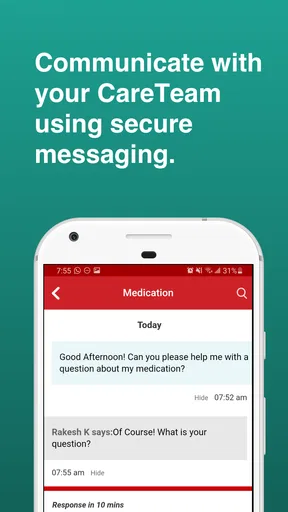
- Secure messaging supports communication with the care team.
- The app can help track prescriptions and treatment-related information.
Limitations of CVS Specialty
- Availability of features may depend on your insurance and specialty program.
- Some users may need separate CVS apps for general pharmacy services.
- Specialty medication enrollment can require additional verification steps.
- Delivery timing may vary for medications requiring special handling.
- Not all treatments or pharmacies may be supported in every location.
Other Releases by CVS Pharmacy
View All
CVS Health
Medical4.5
Similar Picks in This Category
View All
WebMD: Symptom Checker
WebMD, LLC4.1

Microphone Amplifier
DOSA Apps4.2

Anatomy Learning - 3D Anatomy
3D Medical OU4.5

Period Tracker and Calendar
SimpleInnovation4.9

GoodRx: Prescription Coupons
GoodRx4.8
CVS Health
CVS Pharmacy4.5
Frequently Asked Questions
What is CVS Specialty, and who is the app designed for?
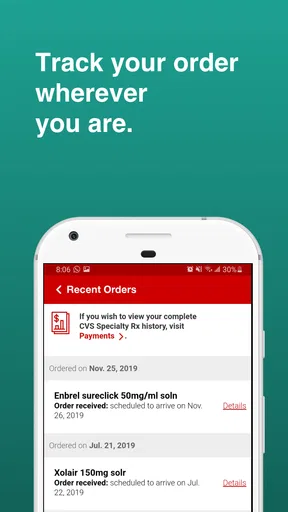
CVS Specialty is a mobile app for people who receive specialty medications through CVS Specialty Pharmacy. It is designed to help patients manage prescriptions, request refills, track deliveries, review medication information, and contact pharmacy support. The app is most useful for users whose insurance plan and prescriptions are serviced by CVS Specialty, rather than for general CVS Pharmacy purchases.
Can I order refills and track my specialty medication delivery?
Yes. After signing in and linking your eligible CVS Specialty account, you can generally view prescription details, request refills, and check the status of deliveries. Availability may depend on your medication, insurance requirements, refill timing, and whether authorization is needed from your healthcare provider. Delivery estimates can also change because of shipping restrictions, weather, holidays, or prescription processing delays.
How does CVS Specialty help me manage medications that require special handling?
The app can provide useful information about specialty prescriptions, including refill reminders, shipment updates, medication instructions, and support options. Some medications require refrigeration, signature confirmation, or specific delivery arrangements, so users should read all instructions carefully. The app is a management tool and should not replace advice from a doctor, pharmacist, or other qualified healthcare professional.
Is my personal and medical information secure in the CVS Specialty app?
CVS Specialty requires account authentication and uses security measures intended to protect personal, insurance, prescription, and health-related information. Users should download the app only from the official Google Play Store or Apple App Store, keep the app updated, and avoid sharing passwords or verification codes. Review the current privacy policy and enable device security features for additional protection.
What should I do if I cannot sign in, my refill is delayed, or I need urgent help?
If you experience login problems, try checking your credentials, updating the app, and using the available password-recovery options. For delayed refills, delivery issues, insurance questions, or prescription concerns, contact CVS Specialty support through the app or the official customer service channels. Do not wait for an app response in an emergency; contact your healthcare provider or local emergency services immediately.
